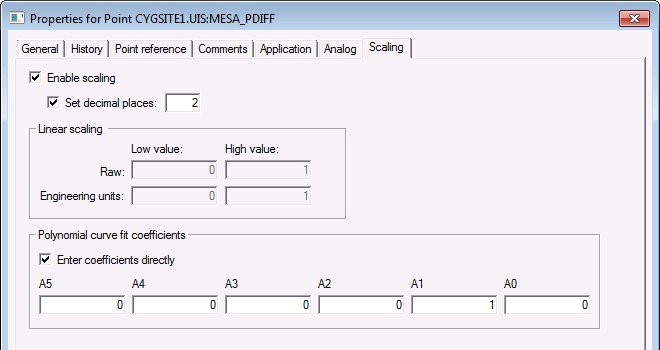
Use the Scaling page to configure scaling properties for a particular Analog point. The Scaling page is shown when the point type is set to Analog Input on the General page. (You cannot scale an output value.)
Values specified for the Raw Low/High and Eng Units Low/High properties are converted into values for the polynomial curve coefficients. As such, if you are importing point information, you must specify the coefficient values. See Scaling Analog Input Point Values for more information.
|
|
| Sample Scaling page for an Existing Point |
These are the properties shown on the Scaling page in the PNT Editor.
See Token Categories - Point: Scaling for the corresponding tokens for each property and Filter Attributes - Point: Scaling for the corresponding filter attributes for each property.
| Property | Description | Default Value |
|---|---|---|
|
Enable scaling |
Enables scaling for the point. Options are 0 (No) or 1 (Yes). |
0 (No) |
|
Set decimal places |
Enables setting the resolution of the scaled value. |
0 (No) |
|
Decimal places |
Specifies the resolution of the scaled value. Option is whole number between -1 to 15. Use -1 for no scaling. |
2 |
|
Enter coefficients directly |
Applies only in the PNT Editor. Enables the coefficient fields. |
|
| Linear scaling | ||
|
Raw low value |
The low value in raw units. Option is rational number up to 16 digits. |
0 |
|
Raw high value |
The high value is raw units. Option is rational number up to 16 digits. |
1 |
|
Engineering units low value |
The low value in scaled (engineering) units. Option is rational number up to 16 digits. |
0 |
|
Engineering units high value |
The high value in scaled (engineering) units. Option is rational number up to 16 digits. |
1 |
| Polynomial curve fit coefficients | ||
|
Coefficient A5 |
A5 value for polynomial coefficient equation. |
0 |
|
Coefficient A4 |
A4 value for polynomial coefficient equation. |
0 |
|
Coefficient A3 |
A3 value for polynomial coefficient equation. |
0 |
|
Coefficient A2 |
A2 value for polynomial coefficient equation. |
0 |
|
Coefficient A1 |
A1 value for polynomial coefficient equation. |
1 |
|
Coefficient A0 |
A0 value for polynomial coefficient equation. |
0 |

|
|
|

